Linksys Velop Pro 7.
Tri-band WiFi 7 with MLO, BE11000-class throughput, and a 5 Gbps WAN port — the practical entry to WiFi 7 without quad-band flagship pricing.
The Verdict.
Gavler Meta-Score
“The most balanced tri-band WiFi 7 mesh in the category — half the price of quad-band flagships, with the headline WiFi 7 features (MLO, BE11000-class throughput, 5 Gbps WAN) intact. Buy the Velop Pro 7 if you want WiFi 7 without paying flagship prices, and if you're comfortable with Linksys's app over Eero's. The Eero Pro 7 at a similar price is the alternative most buyers will cross-shop.”
The Gavler Verdict
The Gavler Review.
Linksys Velop Pro 7 Review: WiFi 7 Without Flagship Pricing
The Linksys Velop Pro 7 ranks number 9 on Gavler's Best Mesh WiFi Systems list with a 7.9, and it exists to answer a question Linksys's quad-band rivals don't ask: does WiFi 7 really need to cost $1,700 for a three-pack? TechRadar's testing backs the value case directly — "Inside the house, the Velop Pro 7 delivered impressive speeds with consistently fast and reliable internet in every room, even in areas that previously suffered from weak signals." Buy it if you want real WiFi 7 features — Multi-Link Operation, BE11000-class throughput, a 5 Gbps WAN port — without paying flagship prices. The trade-off is the app: Linksys's software is functional but noticeably less polished than Eero's.
What it is
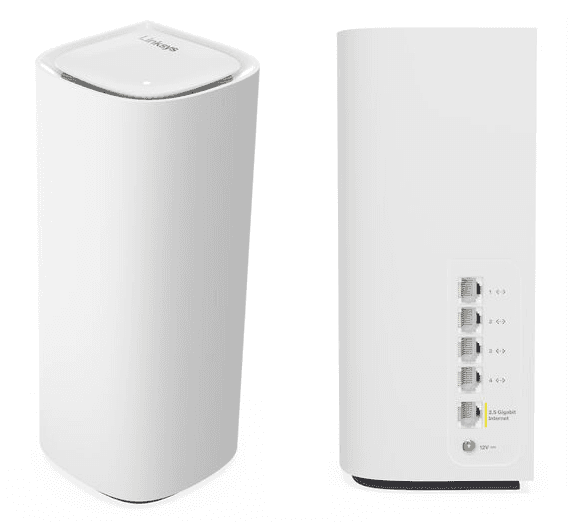
Each of the Velop Pro 7's three nodes carries a tri-band BE11000 radio spanning 2.4 GHz, 5 GHz, and 6 GHz, plus a 5 Gbps WAN port and four 1 Gbps LAN ports. Aggregate capacity tops out just over 10 Gbps — mid-range for the WiFi 7 standard, but comfortably more headroom than any U.S. residential broadband plan a typical buyer is likely to actually have.
The feature that earns the WiFi 7 badge honestly is MLO, Multi-Link Operation. Capable client devices — recent iPhones, MacBooks, and gaming PCs — can communicate across the 5 GHz and 6 GHz bands simultaneously, cutting latency for gaming and video calls. For households with a growing but still-small list of WiFi 7 client devices, MLO is the specific feature that justifies the upgrade over a WiFi 6E mesh; for households with no WiFi 7 clients yet, the system still functions as a strong WiFi 6E mesh while the rest of the household's devices catch up.
In use
TechRadar's assessment of the value proposition was blunt and positive: "May not be the fastest WiFi 7-powered mesh system but it's the most affordable — the system offers tri-band WiFi with a top speed just over 10 Gbps, more than fast enough for most domestic broadband and tasks like online gaming or streaming 4K video." Real-world coverage lands around 3,000 sq ft per node — roughly 9,000 sq ft on a three-pack — with the kind of strong far-room signal Linksys's Velop chassis line has been refining for half a decade. Tom's Guide summarized the overall package as excelling "at reliability, an extra layer of online security, and above all a reasonable price."
Setup through the Linksys app is fast and guided, but this is where the trade-off against the category's polish leader shows up. Linksys's app is capable, not elegant — functional rather than delightful — and the cloud-management story has more rough edges than Eero's. For buyers who specifically value Linksys's history of long-term firmware support and dense physical Ethernet ports, that's an acceptable trade. For buyers cross-shopping primarily on user experience, the Eero side of the comparison usually wins.
Strengths
- Real MLO across 5 GHz and 6 GHz — not a marketing badge, but the actual WiFi 7 feature that reduces latency for capable client devices doing gaming and video calls.
- 5 Gbps WAN port per node is uncommon at this price tier and gives real headroom for multi-gig fiber plans up to 5 Gbps.
- Roughly half the price of quad-band WiFi 7 flagships while keeping the headline features intact — MLO, BE11000-class throughput, and a legitimately fast WAN port.
The trade-offs — who should skip it
- You want the most polished app experience in the category. Linksys's software is functional but not as refined as Eero's — a real consideration if setup simplicity and ongoing management ease matter more to you than raw feature count.
- You need quad-band throughput headroom. The tri-band architecture caps aggregate speed below quad-band flagships like the Orbi 970 or Deco BE95 — fine for typical households, a real ceiling for 80-plus-device smart homes.
- You have zero WiFi 7 client devices and no plans to buy any soon. Without MLO-capable clients, you're effectively paying WiFi 7 pricing for WiFi 6E-class performance today.
How it compares
One rank up on the list, the Netgear Orbi RBK863 is a generation behind on WiFi standard — WiFi 6 with no 6 GHz band at all — but its dedicated backhaul architecture delivers stronger far-room coverage in large, dense-construction homes, at a similar or lower price when discounted.
One rank down, the Amazon Eero 6+ is a dramatically cheaper, dual-band WiFi 6 system built for a completely different buyer: someone replacing a rented ISP gateway on a sub-gigabit plan, not someone shopping for WiFi 7's headline features at all.
The Gavler verdict
A 7.9, with a 78 expert consensus and 82 community rating — the scoreNote calls it "good but not class-leading at the WiFi 7 tier," with community satisfaction reflecting reliability and coverage while expert reservations focus on the app relative to Eero and tri-band throughput relative to quad-band rivals. That's a fair summary: this isn't the best WiFi 7 mesh money can buy, but it's the most balanced one at its price, and for buyers who want the real WiFi 7 feature set without flagship spending, it's the honest, practical entry point into the standard.
Common Questions
For buyers who want real WiFi 7 features at half the price of quad-band flagships, yes. It ranks 9th on Gavler's Best Mesh WiFi Systems list with a 7.9, and TechRadar called it 'the most affordable WiFi 7-powered mesh system,' noting it 'delivered impressive speeds with consistently fast and reliable internet in every room, even in areas that previously suffered from weak signals.'
MLO lets capable client devices — newer iPhones, MacBooks, and gaming PCs — communicate across the 5 GHz and 6 GHz bands simultaneously, reducing latency for gaming and video calls. It's the feature that distinguishes a real WiFi 7 mesh from a relabeled WiFi 6E system, and the Velop Pro 7 keeps it intact despite the tri-band, budget-relative price point.
Buy the Eero Max 7 if app polish and the smoothest possible mesh experience matter more to you than price — it's the flagship WiFi 7 pick on Gavler's list. Buy the Velop Pro 7 if you want the headline WiFi 7 features (MLO, BE11000-class throughput, 5 Gbps WAN) at roughly a third of the Max 7's cost, and you're comfortable with a less polished companion app.
Where to Buy.
Prices checked regularly
90-day price history
Price History
Steady at $1,199 for the entire 90-day tracking window — no increases, no discounts, across 91 tracked days.
Tracked daily across retailers. Vote Want itabove and we’ll alert you the moment the price drops.
Some links are affiliate links — Gavler may earn a commission. This never affects rankings or scores. Learn more.
Precision Engineering
Tri-Band WiFi 7 with MLO
BE11000 tri-band radios with Multi-Link Operation across 5 GHz and 6 GHz for capable clients.
5 Gbps WAN per Unit
Multi-gig WAN port supports ISP plans up to 5 Gbps — uncommon at this price tier.
Cognitive Mesh Steering
Linksys's self-optimizing mesh routing handles client handoff and band steering automatically.
Technical Specifications
The Scoreboard
Good but not class-leading at the WiFi 7 tier. Community scores reflect satisfaction with reliability and coverage; expert reservations focus on the app vs Eero and on tri-band throughput vs quad-band rivals like the Orbi 970 and Deco BE95.
Cast Your Vote
Do you think Linksys Velop Pro 7 deserves the #9 spot in Best Mesh WiFi Systems?
Global Critique
“May not be the fastest WiFi 7-powered mesh system but it's the most affordable — the system offers tri-band WiFi with a top speed just over 10 Gbps, more than fast enough for most domestic broadband and tasks like online gaming or streaming 4K video.”
“Inside the house, the Velop Pro 7 delivered impressive speeds with consistently fast and reliable internet in every room, even in areas that previously suffered from weak signals.”
“Excels at reliability, an extra layer of online security, and above all a reasonable price.”
“A high-speed WiFi 7 router at a more competitive price — the practical entry to the standard for most homes.”
More from Best Mesh WiFi Systems.
See how other top picks compare in this category.
Do You Need Wi-Fi 7 Mesh, or Will 6E Do?
Gbps hangtags are the wrong first question. Wi-Fi 7 vs 6E vs 6 is the generation to buy. Then shop Gavler's live ranking.
Wi-Fi 8 Just Showed Up at IFA — Here's Why You Shouldn't Wait for It
TP-Link showed the first Wi-Fi 8 routers at IFA 2026. But the standard isn't final until 2028 and no client devices exist yet. Here's what to actually buy.
Wi-Fi 7 Buying Guide 2026: Who Actually Needs It, Who Doesn't, and How to Not Overpay
Is Wi-Fi 7 worth it? What MLO actually does, when 6 GHz matters, what to pay in 2026, and the buyers who should honestly skip the upgrade.
eero Pro 7 vs Netgear Orbi 970: The Wi-Fi 7 Mesh Decision That Actually Matters in 2026
The two flagship Wi-Fi 7 mesh systems most worth comparing. Updated July 2026 with current pricing, corrected firmware-support terms, and the Wi-Fi 8 timeline.
The Best Mesh WiFi Systems in 2026, Ranked by People Who Actually Cover Their Whole House
Eero Max 7, Orbi 970, Deco BE95. Gavler's networkers rank the Wi-Fi 7 mesh systems worth buying — for whole-home coverage at speed.