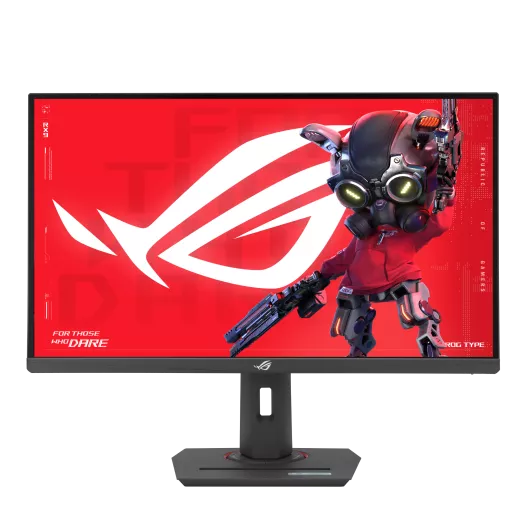
ASUS ROG Strix XG27ACS.
ASUS ROG Strix XG27ACS — 27" 1440p @ 180Hz Fast IPS, 1ms GtG with variable overdrive, HDR400, FreeSync + G-Sync Compatible. Tom's Hardware's reference-class IPS value pick.
The Verdict.
Gavler Meta-Score
“The best-in-class 1440p IPS at sub-$300. The right call for daylight-room workstations, productivity-heavy dual-use displays, and second-monitor builds where OLED isn't the brief.”
The Gavler Verdict
The Gavler Review.
ASUS ROG Strix XG27ACS Review: The Sensible 1440p IPS Gaming Monitor
The ASUS ROG Strix XG27ACS is the monitor to buy when you've decided OLED isn't actually the brief. It's a 27-inch 1440p Fast IPS panel running 180Hz with 1ms response and variable overdrive, HDR400 certified, priced at roughly $290 — a genuine budget relative to the OLED tier just above it on this list. Tom's Hardware called the color accuracy and performance "exceptional," and PC Gamer went further, naming it "the best all rounder" in the crowded 27-inch 1440p field. The honest trade-off is contrast: this is an IPS panel competing against per-pixel OLED blacks, and it simply can't match them in a dark room. In a bright one, it's the better tool for the job.
What it is
Sitting at rank 9 on Gavler's Best Gaming Monitors list, the XG27ACS occupies the value-IPS lane below the OLED panels that dominate the top of this category. Where the KTC G27P6S and its OLED siblings chase per-pixel contrast and near-instant response, the XG27ACS chases something different: reference-class IPS accuracy, high sustained brightness, and zero burn-in risk, all at a price nearly $200 below the OLED entry point.
ASUS still sells the XG27ACS directly and it remains in active production, but it's worth knowing it's no longer alone in its family. ASUS has since released a Gen2 sibling, the XG27ACSR, at a faster 220Hz/255Hz refresh with quicker response time, alongside several higher-refresh variants (up to 320Hz) built on a similar panel formula. None of these replace the original XG27ACS — it's simply become the entry-level model in a lineup that's grown around it, which is a sign of a healthy, ongoing product line rather than an aging one.
In use and performance
The core spec sheet reads well for the price: 180Hz refresh, 1ms grey-to-grey with variable overdrive (a tuning feature that's genuinely rare below $300), VESA DisplayHDR 400 certification, and roughly 97% DCI-P3 color coverage out of the box. PC Gamer's Jeremy Laird, reviewing the monitor at launch, wrote that it was "seriously quick, perfectly calibrated and sensibly priced," and scored it 90 out of 100 — a notably strong mark for a monitor competing on value rather than flagship specs.
That "perfectly calibrated" comment matters more than it might read at first glance. A lot of budget monitors ship with inaccurate factory color that needs correcting before it's usable for anything beyond gaming; this one doesn't need that step, which is why it doubles credibly as a productivity display. TechRadar's assessment landed in the same place, calling it "a really nice gaming panel with great specs for a decent price" and recommending it without major caveats.
The honest limitation is the one inherent to any IPS panel next to an OLED: HDR400 is the entry tier of HDR certification, well below the per-pixel contrast an OLED panel delivers, and dark-scene detail will look flatter here than on the monitors ranked above it. What you get in exchange is a panel that stays bright and legible in a sunlit room, handles a static desktop or taskbar for eight hours a day without any burn-in concern, and costs substantially less to own.
Strengths
The XG27ACS wins on the fundamentals a buyer actually feels day to day: accurate factory color that doesn't need a colorimeter to fix, a refresh rate and response time that comfortably serve competitive gaming, and dual FreeSync Premium plus G-Sync Compatible certification, so it runs tear-free regardless of whether the connected GPU is AMD or Nvidia. At around $290 — sometimes lower during Amazon sales, which have pushed it into the low-$200s in past promotions — it's a genuinely strong price for a panel this well-reviewed.
Trade-offs — who should skip it
Buyers chasing the deepest possible blacks and the fastest possible motion clarity should look at the OLED tier instead; IPS contrast, even a well-tuned one, is a different category of image quality in dark scenes. The single HDMI 2.0 port (rather than 2.1) is also a minor connectivity limitation worth knowing about if a next-gen console is part of the plan — it's fine for PC gaming at 1440p but won't unlock every high-bandwidth mode a newer HDMI standard would. And anyone who's already decided OLED is worth managing the burn-in risk for won't find this monitor a compelling alternative; it's built for a different priority order entirely.
How it compares
Against the KTC G27P6S at rank 8 — an OLED panel at roughly $499 — the XG27ACS is the value counter-argument: nearly $200 cheaper, brighter in a lit room, and free of burn-in management, in exchange for OLED's superior contrast and motion clarity. Against the Acer Nitro XV275K P3biipruzx at rank 10 — a 4K Mini-LED panel at $599 that splits the difference between IPS and OLED — the XG27ACS is the simpler, cheaper 1440p pick for buyers who don't need 4K resolution or Mini-LED's deeper local-dimming contrast. Across all three, the XG27ACS is the entry point: the monitor to buy when the priority is proven accuracy and value, not the newest panel technology.
The Gavler verdict
Score: 7.9/10. The ASUS ROG Strix XG27ACS earns its spot as the value-IPS anchor on Gavler's Best Gaming Monitors list — not the most exciting panel here, but the one that delivers the most reviewer-verified accuracy and performance per dollar. Buy it for a bright room, a dual-purpose gaming-and-work setup, or a first serious monitor upgrade on a budget; step up to the OLED tier only once contrast and motion clarity matter more to you than price and daylight visibility.
Common Questions
Yes, for the specific buyer it's built for: someone who wants 1440p at high refresh in a bright room, or who runs the monitor for productivity as much as gaming, and doesn't want to manage OLED burn-in risk. It won't match an OLED's per-pixel contrast, but at its price it remains one of the most accurate, best-reviewed IPS panels available.
Yes. ASUS now also sells a Gen2 sibling (the XG27ACSR) with a faster 220Hz/255Hz refresh rate and quicker response time, plus several higher-refresh siblings in the same panel family (up to 320Hz). The original XG27ACS is still sold directly by ASUS — it's simply the entry point in a now-larger lineup, not a discontinued model.
Buy the XG27ACS if you work in a bright room, run a static desktop/HUD for long sessions, or want to save roughly $200. Buy the OLED if per-pixel contrast and motion clarity matter more to you than sustained brightness, and you're comfortable managing burn-in risk with a screensaver and taskbar auto-hide.
Where to Buy.
Prices checked regularly
90-day price history
Price History
Steady at $290 for the entire 90-day tracking window — no increases, no discounts, across 91 tracked days.
Tracked daily across retailers. Vote Want itabove and we’ll alert you the moment the price drops.
Some links are affiliate links — Gavler may earn a commission. This never affects rankings or scores. Learn more.
Precision Engineering
Fast IPS 1440p Panel
A 27-inch QHD Fast IPS panel delivers sharp detail with wide viewing angles — more desktop space and clarity than a 1080p screen at this price.
180Hz, Variable Overdrive
180Hz refresh and 1ms grey-to-grey with variable overdrive keep motion clean across the refresh range — a tuning feature rarely found under $300.
Dual Adaptive-Sync
FreeSync Premium and G-Sync Compatible certification eliminate tearing on both AMD and NVIDIA systems without locking you to one GPU ecosystem.
Technical Specifications
The Scoreboard
Reviewers praise its out-of-the-box color accuracy, 180Hz speed and value, with the main caveat that DisplayHDR 400 is entry-level and not a true HDR experience.
Cast Your Vote
Do you think ASUS ROG Strix XG27ACS deserves the #11 spot in Best Gaming Monitors?
Global Critique
“Exceptional accuracy and flexible performance.”
“This is just a really nice gaming panel with great specs for a decent price. Highly recommended.”
More from Best Gaming Monitors.
See how other top picks compare in this category.
How to Choose a Gaming Monitor: 1080p, 1440p, or 4K
A 540Hz hangtag is the wrong first question. Start with 1440p vs 4K, then IPS vs OLED vs size. Then shop Gavler's live ranking.
TCL Is Coming for OLED Monitors — and the Prices Should Follow
TCL just unveiled its 32X3B and 27X3B OLED monitors and is building a fab to crack the panel duopoly. Here's what it means for OLED monitor prices.
4K OLED Gaming Just Crossed Under $650. The Cheapest One Ranks #9 for a Reason.
The Gigabyte MO27U2 is a 27-inch 4K 240Hz QD-OLED for $649 — a panel class that debuted above $1,300. A real price-floor moment, with trade-offs to match.
27-Inch vs 32-Inch 4K OLED: The ASUS PG27UCDM Is the Better Monitor, and the MSI 321URX Just Made That Stop Mattering
Two 4K 240Hz QD-OLED gaming monitors, same resolution, very different sizes — and a price gap that blew open in 2026. Here's which one to buy.
The Best Gaming Monitors in 2026: Pick the Tier, Not the Spec Sheet
ASUS ROG, MSI, Alienware, Samsung, LG. Gavler ranks the best gaming monitors of 2026 — 4K OLED, 1440p OLED, ultrawide, and budget picks, by tier.