Best Kindle Oasis Alternative (Boox Page Review)
Maneetpaul Singh
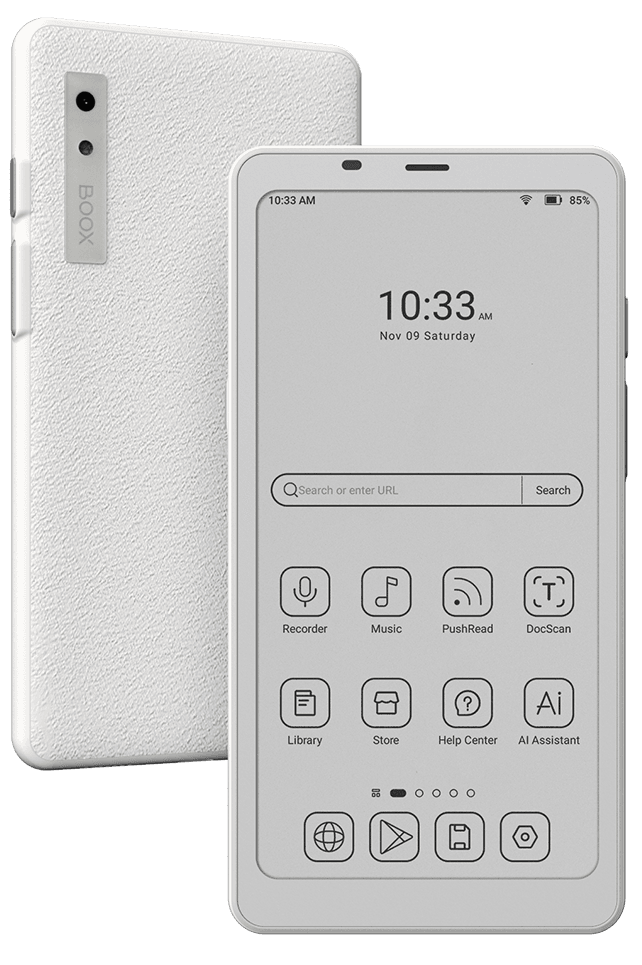
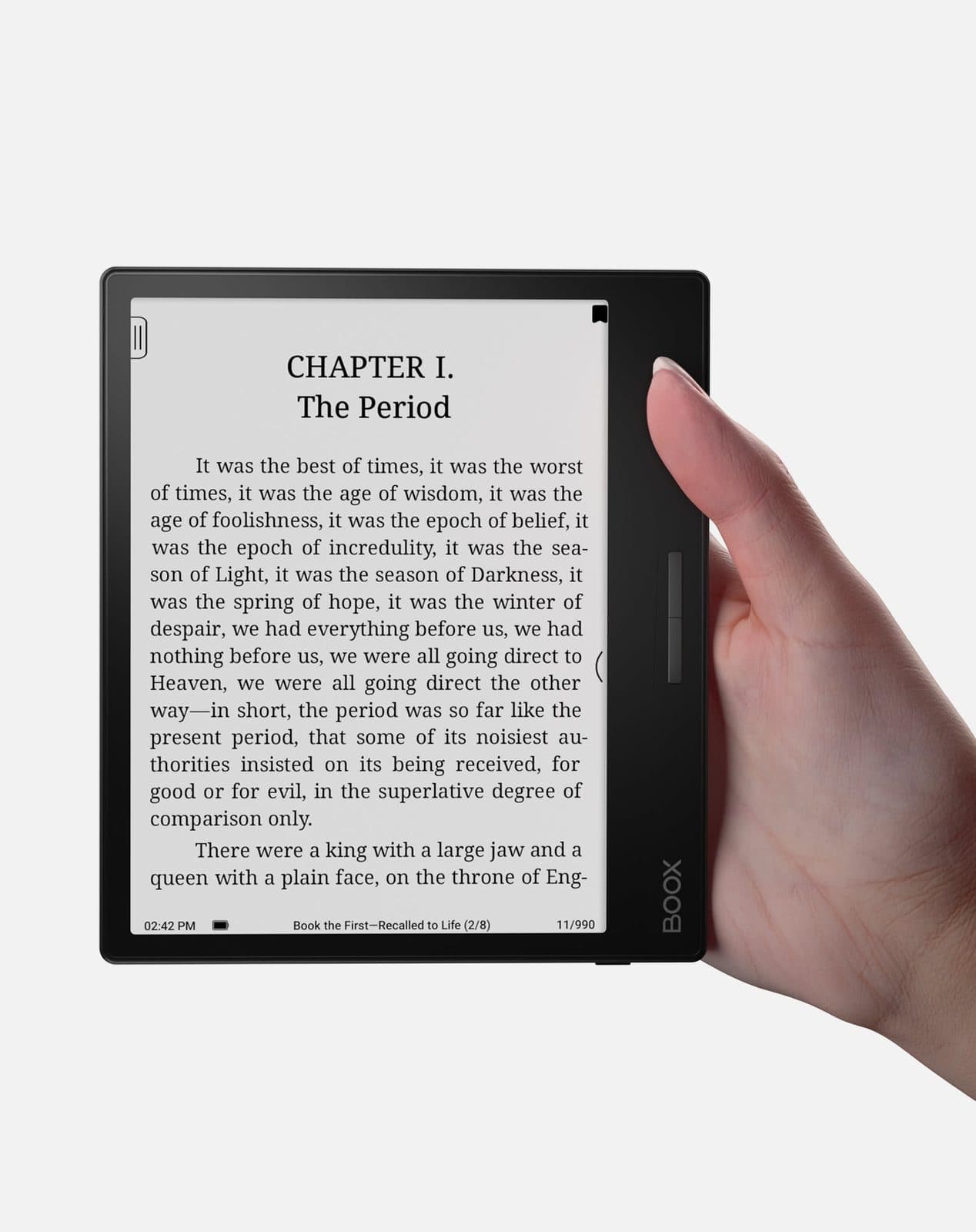
A 7-inch Carta 1200 display with octa-core processor and 3 GB of RAM. Runs full Android for maximum app flexibility and control — perfect for users who want total customization.
Gavler Meta-Score
“The Boox Page is for the reader who's done with vendor lock-in: full Android 11 and the Google Play Store let you run Kindle, Kobo, and Libby side by side, with physical page-turn buttons and a microSD slot no Kindle on this list offers. The catches are real — no waterproofing, a fiddly interface, an occasional Control Center screen-overlay bug, sluggish Android apps, and a $249 price that brushes the Kindle Scribe. Buy it if flexibility matters more than polish; if you want something that just works, the Paperwhite is the easier call.”
The Gavler Verdict
Onyx Boox Page Review: Full Android Freedom, With a Content Catch
The Onyx Boox Page ranks ninth on Gavler's Best E-Readers list with a 9.0, and Android Police's verdict captures exactly why: "The Onyx Boox Page reminds me of the Atari Jaguar video game console from the 90s. It featured great hardware and a lot of cool capabilities, but without great games to play — it was a tough sell." Buy it if cross-store flexibility, physical page-turn buttons, and total control matter more to you than a device that just works out of the box. Skip it if you want to unbox an e-reader and start reading in five minutes.
Nearly every e-reader locks you into one bookstore. The Boox Page's entire reason for existing is refusing to do that: it runs a simplified Android 11 with full Google Play Store access, so you can install the Kindle app, the Kobo app, and Libby side by side and read across all three ecosystems on a single 7-inch device. TechRadar summed it up neatly — it's "like having two ereaders in one tablet." That software freedom is paired with hardware most single-ecosystem readers have abandoned: physical page-turn buttons on the face of the device, in the tradition of the discontinued Kindle Oasis, plus a microSD card slot and a built-in speaker for audiobooks.
Under the glass sits a 7-inch E Ink Carta 1200 panel at 300 ppi — one generation behind the newer Carta 1300 screen on devices like the Kobo Clara BW, but still sharp, flush-mounted glass rather than the sunken plastic bezel of cheaper readers. Android Police called the resulting text "sharp and clear," while noting images "may appear less vibrant due to the lack of color" — an inherent limitation of grayscale E Ink, not a Boox-specific flaw.
The Play Store access is the feature that defines the device, and it delivers exactly what it promises — with real friction attached. Android Police tried using the Kindle Android app as a workaround for the missing retail bookstore and found "it was an awful experience — the content was slow to load and prone to lag, and the physical navigation buttons didn't work in the Kindle app." That's a meaningful caveat: the device's biggest selling point (run any bookstore app) doesn't perform equally well across every app you'd want to run.
Onyx's own first-party software fares much better. PushRead handles RSS subscriptions cleanly, BOOXDrop syncs files wirelessly between a PC and the device without a cable, and NeoBrowser renders standard web pages readably on E Ink — small touches that show up consistently well-reviewed across outlets. Battery life is genuinely excellent: Android Police measured roughly a week of regular use on a single charge of the 2,300mAh cell, with standby drain described as "virtually non-existent." TechRadar's own testing landed similarly, at about 4.5 weeks when averaging two hours of reading a day.
The catch that both outlets converge on is content sourcing. Android Police was blunt: "the Boox Page is held back by the lack of a proper store to purchase retail e-books. While there is something labeled a 'store,' it's merely a collection of public domain works." You're expected to bring your own library or install someone else's storefront — a genuinely different ownership model than a Kindle or Kobo, and one that rewards readers who already have files or accounts elsewhere.
On Gavler's list, the Boox Page sits one rank below the Kobo Clara BW — the device to pick instead if you want the sharpest possible reading experience with zero setup friction and don't care about running multiple bookstore apps. One rank down, the Amazon Kindle (2024) represents the opposite philosophy entirely: a closed, frictionless ecosystem with no configuration required, at less than half the Boox Page's price. The Boox Page's case against both: it's the only device on this list that lets you keep your existing Kindle and Kobo libraries on one screen, if you're willing to do some setup to get there.
A 9.0 that reflects a genuinely capable, if niche, device. TechRadar rated it 4 out of 5 and Android Police's extensive hands-on testing backs up both the real strengths — build quality, battery life, physical buttons — and the real friction, especially around content sourcing and inconsistent third-party app performance. Buy the Boox Page if you're already reading across Kindle and Kobo and want to consolidate onto one screen, or if physical page-turn buttons are a non-negotiable. If you just want something that works the moment you open the box, the Kindle Paperwhite at the top of this list is the easier call.
Yes, if vendor lock-in is the thing you're trying to escape. It ranks ninth on Gavler's Best E-Readers list with a 9.0. Android Police summarized the trade-off precisely: it 'offers a great E ink display, good build quality, and the freedom of Android, but unless you bring your own content to the table, it makes the conversation more complicated than it needs to be.' Buy it for the flexibility; go in knowing there's real setup work involved.
Yes — it ships with full access to the Google Play Store, so you can install the Kindle, Kobo, and Libby apps directly and read across all three stores on one device. TechRadar called it 'like having two ereaders in one tablet.' The trade-off, per Android Police's testing, is that the Kindle app specifically ran slow and laggy on the e-ink screen, and the physical page-turn buttons didn't work inside it.
Not really. Android Police found Onyx's built-in 'store' is 'merely a collection of public domain works' rather than a retail catalog — you're expected to install Kindle, Kobo, or another store's app instead. That's the device's central trade-off: total flexibility in exchange for doing the setup work other e-readers do for you out of the box.
Prices checked regularly
90-day price history
Steady at $250 for the entire 90-day tracking window — no increases, no discounts, across 90 tracked days.
Tracked daily across retailers. Vote Want itabove and we’ll alert you the moment the price drops.
Some links are affiliate links — Gavler may earn a commission. This never affects rankings or scores. Learn more.
Install Kindle, Kobo, Libby, or Pocket and read across all of them — the only reader on this list not locked to a single bookstore.
Dual front buttons (remappable to page-turn, scroll, or volume) for one-handed reading — the feature Amazon dropped when it discontinued the Kindle Oasis.
Expandable storage for large comic and audiobook libraries, plus a built-in speaker and Bluetooth 5.0 for wireless audio.
Experts (TechRadar 4/5, Android Central) praise the Play Store flexibility and physical page-turn buttons but flag the lack of waterproofing, a non-intuitive interface, sluggish Android apps, and a $249 price near the Kindle Scribe's. Community scores skew higher among power users who value sideloading and reading across the Kindle and Kobo stores on one device.
Do you think Onyx Boox Page deserves the #9 spot in Best E-Readers?
“Access to the Google Play Store means you can download both the Kindle and Kobo apps and find your next piece of content there. It's not perfect, but it's like having two ereaders in one tablet.”
“The user interface takes a little getting used to — it's not as intuitive as, say, Kindle or Kobo, but you do get a lot of control on how you want your e-paper tablet set up.”
“It has full access to the Play Store, a gorgeous backlit screen, and is a great companion for those wanting to just sit back and catch up on a book or read the news.”
“Just don't expect to see very many updates, and you might want to be careful taking this to the beach.”
Watch
Hand-picked from creators we trust — playable inline.
Best Kindle Oasis Alternative (Boox Page Review)
Onyx Boox Page Review - Narration & Pics Only
Onyx Boox Page Unboxing: A Versatile Android eReader Worth the Effort
Boox Page - Unboxing and First Impressions of the 7" Android E-Ink Reader That Improves On Leaf 2
Leaf 3 !? No, it's the Onyx Boox PAGE Review
Onyx Boox Page is a new e-reader with page-turn buttons
See how other top picks compare in this category.
Kindle logos and color stickers are the wrong first question. Dedicated E Ink vs a tablet, then B&W vs color vs stylus, then the store. Shop Gavler's live ranking.
Amazon quietly hiked every Kindle $40–$50 overnight, blaming the memory shortage. Kobo held its prices — here's the better e-reader for your money now.
Prime Big Deal Days runs October 6-7, 2026. The Kindle and Kobo picks worth watching, their historical lows, and which to buy at full price anyway.
Eight graduation tech gifts pulled from Gavler's community-ranked lists. Eight categories, eight price points, eight grads who actually use the thing past July.
Amazon's Paperwhite vs Kobo's Libra Colour, refreshed for Prime Day 2026. Which e-reader fits your library, your hands, and how you actually want to read.
Kindle, Kobo, Boox. Gavler's readers rank the e-readers worth buying — by display, battery, library access, and which feel best in the hand.